
Views: 0 Author: Site Editor Publish Time: 2026-05-21 Origin: Site


Unreadable barcodes lead directly to delayed shipments. They trigger platform penalties and force frustrating manual rework. Poor label choices have a severe business impact. In high-volume logistics, these tags are not just paper. They serve as critical tracking infrastructure. Selecting the wrong tag wastes valuable time. It also shortens your printer hardware lifespan.
A successful deployment requires careful matching. You must align the label material to its environmental journey. You also need to satisfy strict fulfillment platform sizing rules. Finally, you must account for specific hardware constraints. Ignoring these factors leads to scanner failures and lost packages.
This guide walks you through the exact selection process. You will learn how to choose the right print technology. We will explore various material types and their ideal environments. You will also discover how to verify hardware compatibility. Following these steps ensures your fulfillment process remains fast and efficient.
Direct thermal is the industry standard for shipping labels due to its ink-free, high-speed efficiency, while thermal transfer is reserved for long-term inventory tracking.
Standard matte paper fits 90% of shipping needs, but waterproof label synthetics are strictly required for exposed or extreme weather routes.
Always verify hardware compatibility using a 4-step checklist: print width, roll outer diameter, sensor type, and brand-locked DRM.
Avoid high-gloss finishes and colored backgrounds to ensure a 100% first-pass read rate for any barcode label.
Many buyers purchase the wrong label chemistry for their operations. This common mistake creates serious bottlenecks. It results in faded tags or unnecessary consumable costs. Understanding the underlying technology prevents these expensive errors. You must choose between direct thermal and thermal transfer systems. Each serves a very distinct operational purpose.
Direct thermal technology dominates the ecommerce industry. The mechanism relies on a heat-activated coating. The printer requires no ink cartridges. It also requires no replacement ribbons. The printhead simply applies direct heat to the paper. The heated areas instantly turn black to form the image.
This method offers incredible speed and simplicity. It is best for short-term transit periods. The prints typically last between one and six months. You will use this technology for ecommerce packages and high-volume fulfillment. It keeps packaging lines moving quickly.
However, this technology has strict limitations. The chemical coating remains highly reactive after printing. It is vulnerable to extreme heat. Prolonged UV exposure will cause the entire surface to darken. Heavy friction also degrades the printed image quickly.
Thermal transfer works entirely differently. The mechanism uses heat to melt a specialized ribbon. The printer transfers resin or wax from the ribbon onto the paper. This creates a highly durable, permanent bond on the surface.
You use this technology for permanent asset tracking. It is best for outdoor storage scenarios. It provides excellent chemical resistance for industrial manufacturing. The print will survive harsh conditions for many years.
The limitations mostly involve speed and complexity. You face a higher cost per print. You must also purchase and store replacement ribbons. Ribbon changes slow down fast-paced shipping lines. Operators must stop the machines to swap out depleted rolls.
For standard transit and order fulfillment, default to direct thermal technology. It provides the exact lifespan you need for delivery. It eliminates ribbon inventory management. This choice streamlines your entire packaging workflow.
Print Technology | Mechanism | Expected Lifespan | Ideal Use Case |
|---|---|---|---|
Direct Thermal | Heat activates chemical coating | 1 to 6 months | Standard transit, ecommerce packages |
Thermal Transfer | Heat melts wax/resin ribbon | Years to permanent | Asset tracking, outdoor storage |
You must match your label material to its physical journey. A package sitting in a dry truck requires basic materials. A package sitting in the rain demands advanced synthetics. Choosing the correct thermal sticker prevents frustrating delivery failures.
Standard white matte paper serves as the industry workhorse. It is highly cost-effective for daily operations. It adheres perfectly to standard corrugated boxes. You will use this for standard carrier networks. It thrives when packages stay in largely controlled environments.
Most standard deliveries travel from a dry warehouse to a covered porch. Matte paper easily survives this predictable journey. It provides sharp contrast for barcode scanners. It represents the smartest choice for standard ecommerce fulfillment.
Standard paper fails quickly under harsh conditions. You must upgrade your material for demanding routes. Synthetic options usually feature Polypropylene or PET plastics. They resist tearing under heavy strain. They repel moisture entirely. They also resist severe smudging during transit.
You need these materials for heavy-duty freight operations. Cold-chain logistics also require moisture-resistant tags. Condensation easily destroys standard paper. You must specify a rugged waterproof label for packages left in outdoor residential zones. They ensure your barcodes remain perfectly scannable in the rain.
Certain materials actively sabotage your logistics network. You must avoid them to maintain high scanning accuracy.
High-Gloss Finishes: Glossy surfaces reflect ambient light. This glare directly interferes with infrared and laser scanners. It causes massive read failures. Always choose matte finishes.
Colored Backgrounds: Bright colors reduce the contrast ratio. Scanners need a stark difference between the black lines and the background. A neon background ruins scanning accuracy. Fluorescent colors serve well for visual warning tags. They should never host a tracking barcode label.
Removable Adhesives: Removable glues pose a high risk. The tag easily detaches during transit friction. A box without a tag becomes lost inventory. Always specify aggressive, permanent adhesives for corrugated cartons.
Fulfillment platforms dictate strict sizing rules. You cannot invent your own dimensions. A properly sized shipping label ensures seamless platform integration. It guarantees the carrier networks can process your box.
The 4" x 6" (100mm x 150mm) format rules the logistics world. It serves as the mandatory baseline for major platforms. Amazon FBA enforces this size for receiving. Shopify defaults to this dimension for outgoing orders. UPS and FedEx design their scanning systems around it.
Using this standard dimension prevents formatting errors. You avoid tiny, unreadable tracking codes. You also prevent the software from awkwardly splitting the image across two pages. Always configure your default software settings to match this exact size.
Sometimes you need different dimensions for specialized tasks. The A6 format closely mirrors the 4x6 standard. Some businesses use a longer 4" x 8" format. This extended size accommodates combination slips. It prints the tracking code and the packing list simultaneously.
You might also use 2-inch or 3-inch widths. These smaller formats do not work for standard freight. They are typically reserved for product identification tags. Retailers use them for pricing stickers. They also work for small USPS First Class mailers.
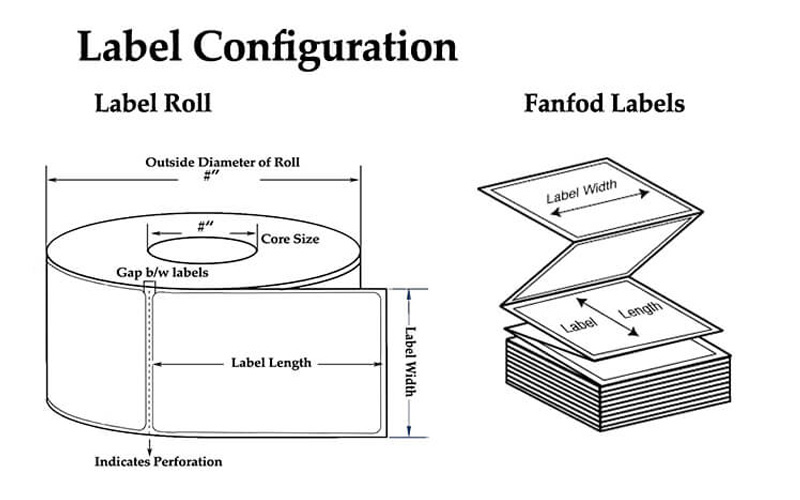
You must decide how the paper enters your machine. The form factor dictates your physical workstation setup.
Rolls: Rolls work best for enclosed desktop printers. The paper sits securely inside the machine housing. This protects the paper from dust and damage. It provides a clean, compact footprint for small shipping stations.
Fanfold (Sheet stacks): Fanfold paper sits outside the printer in a large stack. The machine pulls the sheets through a rear slot. This setup is best for ultra-high-volume environments. A fanfold stack holds far more tags than a small roll. It drastically reduces reloading frequency during busy shifts.
Buying the wrong roll creates immediate physical problems. An incompatible roll causes sensor errors. It might physically jam the printer mechanism. Experts always verify hardware constraints before purchasing supplies. Walk through this simple elimination process to ensure perfect compatibility.
Maximum Print Width: Ensure the printer supports a full 4-inch width. Many compact, budget-friendly models max out at 2 or 3 inches. If you buy 4-inch paper for a 3-inch machine, the lid will not close. The machine becomes useless for standard logistics.
Roll Outer Diameter (OD) & Core Inner Diameter (ID): Check the physical dimensions of the spool. Desktop printers typically max out at a 5-inch OD. They require a small 1-inch core to fit the internal spindle. Industrial printers feature massive internal chambers. They support 8-inch ODs on a larger 3-inch core. A roll that is too thick will rub against the printer lid.
Sensor Alignment: Your printer needs to know where one tag ends and the next begins. Check how the machine calibrates the feed. Most use "gap" sensing. This shines a light through the blank space between tags. Others use "black mark" sensing. They look for thick black lines printed on the backing paper. You must buy rolls that match your sensor type.
Brand Lockout (DRM Check): Certain manufacturers lock their machines. Specific Dymo or Zebra models use proprietary RFID chips. These chips hide inside the roll core. The printer scans the chip before allowing operation. Third-party universal rolls lack this chip. They will not function in these brand-locked machines. Always verify if your machine requires chipped supplies.
Even the best materials fail if handled improperly. You must train your operators on proper handling techniques. Poor storage and careless touching destroy the chemical coating. You must implement strict protocols to protect your supplies.
Human hands pose a major threat to direct thermal surfaces. Instruct your operators to avoid touching the printable side with bare hands. Hand oils create a microscopic barrier on the paper. This oil prevents proper heat activation during the printing cycle.
The result is a faded or missing section of the barcode. A scanner cannot read a code with dead spots. Operators should handle the tags by the edges. They should only touch the backing paper during installation.
Sometimes you need to verify your inventory. You might forget if a batch uses direct thermal or transfer technology. You can perform a quick physical verification. Quickly scratch the printable surface with a fingernail or a coin.
The friction generates immediate physical heat. If the paper uses direct thermal chemistry, it will leave a stark black mark. If the paper remains white, it requires a ribbon. This simple trick prevents loading the wrong supplies onto the line.
The chemical coatings require careful safety considerations. Traditional thermal coatings use BPA (Bisphenol A). They use it as a color developer. Health organizations flag BPA as an environmental and handling concern.
You must protect your operators during safe daily handling. If you operate in food or healthcare logistics, you face strict compliance rules. You must actively source "BPA-Free" tags. You should also look for RoHS-certified products. These safer alternatives protect your staff and ensure regulatory compliance.
Poor storage ruins supplies before they ever reach the printer. Heat and light activate the chemicals prematurely. Store all backup rolls in climate-controlled environments. Keep them in dark cabinets or closed boxes.
Avoid placing inventory near direct sunlight. Keep boxes away from industrial radiators or heating vents. Proper storage prevents premature activation. It prevents the paper from yellowing or degrading over time.
Choosing the correct tag goes far beyond picking a random roll of paper. It hinges on balancing several critical factors. You must select the right technology for speed and efficiency. You must balance the physical environment against material durability. You also need strict alignment with your printer's hardware limits.
Always base your decision on your actual logistics network. Use matte paper for controlled carrier routes. Upgrade to synthetics when facing harsh weather. Double-check your hardware limits before buying bulk supplies. Skipping these checks leads directly to operational bottlenecks.
Your next step requires physical testing. We strongly recommend ordering a small sample batch first. Test the adhesive strength on your actual corrugated boxes. Run the sample through your machines to verify scanner readability. Once the sample passes your field tests, you can safely execute a bulk procurement.
A: Standard paper thermal labels are splash-resistant but not waterproof. A few drops of rain will not ruin them immediately. However, heavy moisture destroys the paper fibers. For true water resistance, you must upgrade to synthetic Polypropylene or PET thermal labels. These plastic-based options repel water entirely.
A: Yes. They are designed exclusively for short-term use. Their typical lifespan is about 6 to 12 months. Exposure to extreme heat, direct sunlight, and heavy friction will rapidly accelerate this fading process. They are not suitable for permanent inventory tracking.
A: This is usually a sensor calibration issue. First, ensure you have selected the correct label size in your printer's software settings. Next, check the physical gap or notch sensor inside the machine. Make sure the sensor is completely clean and properly aligned with the paper path.
A: No. Direct thermal printers use focused heat to activate a specialized chemical layer on the paper itself. This entirely eliminates the need for ink cartridges or toner. It provides a fast, maintenance-free printing process for high-volume fulfillment environments.


